Walksnail video
The supported Walksnail system supplies the native image. An analog bay is not part of this path.
Author:Military Drone Manufacturer TIME:2026-10-09
Walksnail Goggles X can display analog video through its AV input, but the headset alone is not a complete analog receiving setup. You still need a suitable analog receiver, its antennas and power, a supported connection to the goggles, and a practical way to carry the extra hardware. A receiver bay or extension board may supply part of that arrangement; it should not be confused with the receiver itself. If you also want saved analog footage, specify recording separately. The important purchase question is which parts are missing from your particular setup, not simply whether the goggles have an analog mode.
An AV socket accepts a video signal that another device has already received. It does not replace the radio receiver that picks up the aircraft's analog transmission. This distinction is easy to miss when a listing puts “digital and analog” beside a photograph of the headset.
For a pilot keeping an existing analog quad, start with the ground equipment already owned. A compatible receiver with a usable video output may remain useful. A receiver module intended for a goggle bay needs a suitable host arrangement, while a self-contained receiver has its own connection requirements. Do not order a second receiver before identifying the first one.
The supported Walksnail system supplies the native image. An analog bay is not part of this path.
An external receiver supplies the analog picture. The bay, lead and power arrangement must suit that receiver.
A compatible source supplies HDMI video. This is another input, not evidence of a built-in analog receiver.
These paths explain the shopping list; they do not rank image quality or establish a latency figure. Changing the input label cannot make an unsupported transmitter compatible. Keep the aircraft-side video hardware and the ground-side input listed separately.
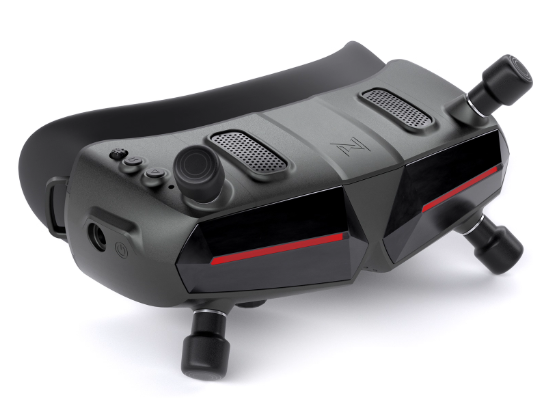
“Analog adapter” is an imprecise shopping term. It can describe a holder, a powered receiver bay or a cable arrangement. Ask what the named accessory actually does before deciding that it completes the system.
| Analog receiver | Receives the aircraft's analog video transmission. Confirm the exact model, supported signal and output connection; an empty bay is not this component. |
|---|---|
| Bay or extension board | Accommodates a receiver module and provides the interfaces specified for that accessory. Check module compatibility and whether a receiver is supplied or sold separately. |
| Video lead | Carries the receiver's output to the intended goggle input. It must have the correct connections at both ends, not merely plugs of a familiar diameter. |
| Power and mounting | Supply and support the additional hardware. Account for the receiver and accessory requirements, cable strain and access to the headset's controls. |
| Analog recording device | Creates a saved analog file if that is required. Identify its storage and controls separately from the goggles' native recording features. |
The current Caddx extension-board listing describes a receiver-bay role. Its packing list names the board and power leads, and its notes say the 3.5 mm cable may require a separate purchase. Treat these as separate order lines, rather than assuming every item shown in an installation picture comes in one box.
For a receiver you already own, ask the supplier to name the bay and lead intended for that exact unit. A reply that repeats “works with analog” leaves the key question unanswered.
The Goggles X specification distinguishes HDMI input, HDMI output and a five-pin 3.5 mm connection. Input and output are different jobs: a cable connected to an output does not deliver a source picture into the headset.
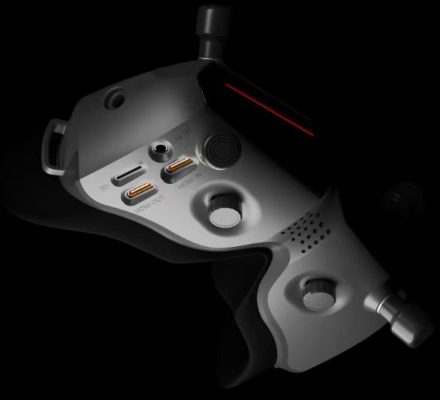
Caddx sells a dedicated four-pole-to-five-pole angled cable for Goggles X. That product name is a useful warning against substituting an ordinary audio lead because it appears to fit. The correct lead depends on the accessory at its other end as well as the goggles.
Mechanical fit also deserves attention. Check that the plug body can seat fully without being forced, that the cable does not press against the face pad, and that its route leaves the controls usable. A short lead can become awkward when a module sits far from the socket; a long loose lead can pull on it when the headset is lifted.
Confirm connections with power disconnected and use the accessory maker's instructions for power and polarity. This article is a purchasing guide, not a substitute pinout for building an improvised adapter.
Old installation advice and a current accessory listing do not necessarily describe the same hardware. The Caddx extension-module tutorial published on 26 September 2024 discusses goggles without built-in head tracking. The current extension-board page separately refers to newer goggles with that feature already present.
Send the supplier the goggles' revision information, the receiver model and a photograph of the relevant accessory label. Ask for the current installation document that covers that combination. If an older tutorial seems to exclude your goggles while the current sales page suggests an accessory is relevant, get that discrepancy resolved before purchase.
A purchase date can help a supplier investigate a batch, but it is not a reliable substitute for identifying the delivered hardware. Stock can remain on a shelf, and second-hand equipment may have changed hands long after manufacture.
Seeing analog video in the goggles does not demonstrate analog DVR. In its Goggles X Q&A dated 16 December 2023, Caddx directed users who wanted analog recordings toward an analog receiving module with recording support. A manufacturer-hosted review also reported that AV and HDMI inputs did not use the native Walksnail DVR at the time of that review.
Those dated statements are not a promise about every future firmware release. They are a reason not to budget on input recording without current confirmation. For an order that requires footage, name the input and the device expected to save it. Do not accept a native Walksnail recording as proof that an analog input is being recorded.
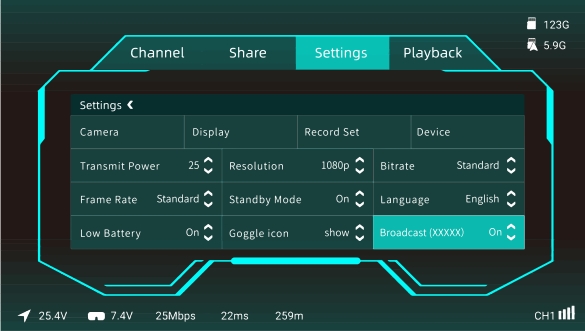
If a receiver provides its own recorder, the card, file location and start/stop control belong to that recorder's workflow. Plan where the operator can reach its controls while wearing the headset. A recording requirement that is inconvenient to use can still be missed even when the hardware technically supports it.
For later review, ask for a file from the proposed analog setup, not a promotional clip with an unknown source. Keep the original sample and note which device created it.
A useful demonstration answers a few narrow questions with the proposed equipment. It need not become a flight test. Request a stationary check in an appropriate location, following the manufacturers' power, antenna and cooling instructions; keep propellers removed if an aircraft is powered on the bench.
A working stationary picture proves only that particular connection during that check. It does not establish operational range, airborne reliability or suitability for an event's rules. Keep those claims outside this accessory decision.
No. The AV input needs an analog video source. For an aircraft's wireless feed, the receiving hardware remains a separate requirement. Check what receiver, host arrangement, power and cabling you already own before adding accessories.
Do not assume so. Identify a receiver model in the actual order. A board advertised as a receiver bay is not, by that description alone, a complete receiving module. Read the current package contents and ask about any separately supplied parts.
That should be confirmed for the specific hardware. The manufacturer's older tutorial and current accessory notes describe different head-tracking situations. Use the goggles revision and receiver model to obtain a matching recommendation, rather than choosing only by a tutorial's title.
Do not rely on that without explicit support for the input and firmware in use. If analog recording is required, have the seller identify the recorder and demonstrate a saved file from that path. A visible picture alone is insufficient.
A cable cannot receive an aircraft's analog transmission. An HDMI-based arrangement would need a suitable source that produces HDMI, plus verified display compatibility. It is a different equipment path, not a shortcut that removes the receiver requirement.
Use the Avatar HD Goggles X product record to identify the headset under discussion, then describe the analog receiver you plan to retain or buy. State whether the goal is viewing only or viewing plus saved footage. That distinction can change the accessory list more than the headline display specification.
A useful order note: “Please identify the receiver, its bay or mount, the exact video lead and each power lead for my Goggles X revision. List what is supplied and what I must provide. If analog recording is included, name the recording device and provide a sample file from that input.”
The finished list should let you point to one named part for each job. If “adapter included” is still doing the work of several unidentified components, the order is not specific enough yet.

 Tel: +86-13959965075
 Email: info@fpvdroneskit.com
 MP/WhatsApp: +86-13959965075
 Manufacturer Address:Quanzhou Valley Nanan Science and Technology Innovation Center, No. 89 Shijing Avenue, Shijing Town, Nanan City, Fujian Province