
Description Catalog Related Service FAQ Reviews
YOUR POSITION:HOME > DRONES & Kits > FPV Drone Kits >

Avatar HD Goggles X Digital FPV Goggles 1080p100fps Low Latency Long Range

Price: $
Model: Avatar HD Goggles X

Get Quote


Product Description

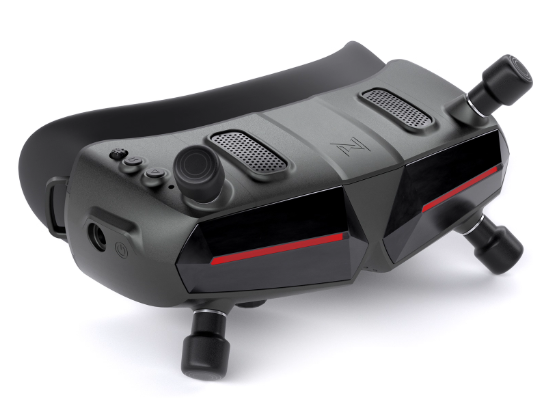
Avatar HD Goggles X is a professional-grade digital FPV goggle supporting up to 1080p100fps video transmission with ultra-low latency of 22ms and a transmission range exceeding 4 km. It features an OLED high-definition screen, adjustable interpupillary distance (IPD) and diopter, supports 7V–26V wide voltage input, and up to 256GB Micro SD storage. With the latest firmware updates, it delivers a stable and immersive FPV experience, perfect for racing, aerial photography, and recreational flying.

Key Features

  • High-definition video: 1080p100fps / 720p100fps selectable, up to 50Mbps bitrate

  • Ultra-low latency: Average 22ms for real-time control

  • Long-range transmission: >4 km, left-hand circular polarization (LHCP) antenna

  • OLED HD display: 1920x1080/100Hz, adjustable IPD 57–72mm, diopter +2.0 to -6.0

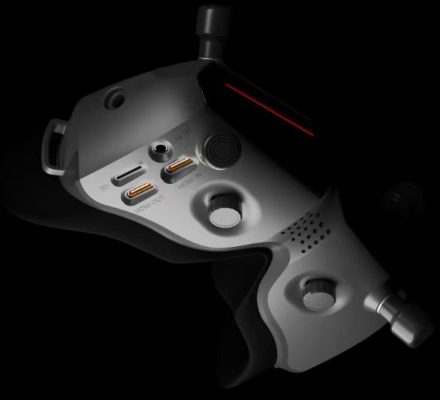
  • Multiple interfaces: HDMI in/out, 5Pin 3.5mm plug, DC5.5*2.1mm power port

  • Power compatibility: 7V–26V (2S–6S)

  • Storage support: Up to 256GB Micro SD card

  • Communication protocols: IEEE 802.11b/g/n/ax WiFi, BLE 5.2 Bluetooth

  • Safe firmware upgrade: SD card upgrade ensures the goggles always have the latest firmware

Operation Instructions

  • Connect the goggles and the VTX power supply.

  • After powering on, press the pairing buttons on both the goggles and VTX. When entering pairing mode, the VTX LED turns red, and the goggles buzzer emits "beep… beep… beep…".

  • After successful pairing, the VTX LED turns solid green, and the goggles buzzer stops while displaying the video feed.

Menu Channel

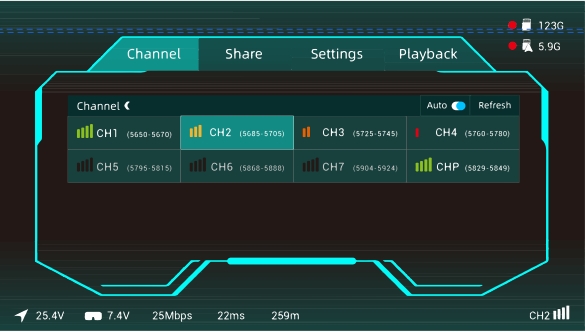
  • display the interference of each channel, signal strength is divided into 4 cells, 3 cells, 2 cells, 1 cell, space, signal display space is occupied unselectable, white stroke for the selection box, press the confirmation key to highlight, highlight the current channel.
  • channel working logic, standard bit rate and high bit rate switching will set the current channel to CHP, need to re-select the channel, CHP is a public channel easy to be interfered with and not recommended to be used for flight work, Auto switch is to automatically refresh the whole channel signal interference, Refresh is to manually refresh.
  • each country channel display, FCC standard display 8 channels (CH1/2/3/4/5/6/7/P), CE/SRRC standard display 4 (CH1/2/3/P), MIC standard display 3 (CH1/2/P). Only FCC mode can turn on high bit rate mode, and 8 channels become 4 channels CH1, CH2, CH3, CHP.

menu settings

  1. Camera:
    Camera adjustable contents are Scene Preset, Exposure, Saturation, Sharpness, White Balance, Frame Rotation, Frame Ratio, 3D Noise Reduction, Shutter, Maximum ISO and other settings.
  2. Display:
    The display can be adjusted for Debug, Screen Brightness, Focus Mode, Custom OSD, OSD Position, Upgrade Font, Custom Font, Viewfinder Frame, Viewfinder Frame settings.
  3. Record set:
    Recording can be adjusted as VTX Transmitter Resolution, Recording Device, Auto Start/Stop, Loop Recording, Format SD Card, Format Transmitter, Built-in EIS Stabilization, Recording Time, Recording Format, Color, Saturation, Sharpness.
  4. Device:
    The device can be adjusted as Buzzer Volume, Ranging Mode, Signal Loss Alert, Restore Factory Settings, Device Information, Operation Instruction, Switch Mode.
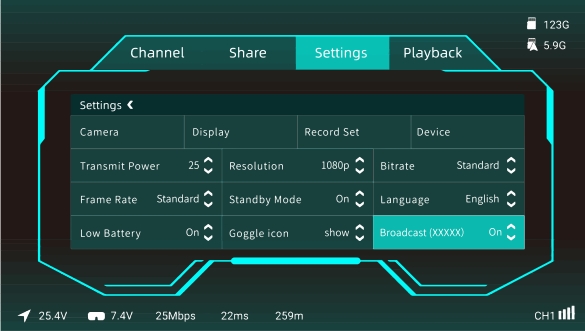
  5. Transmit Power: Transmit power can be selected from 25mW, 200mW, 500mW, 700mW by default.
  6. Resolution:
    Resolution can be selected from 720P and 1080P.
  7. Bitrate:
    Standard bit rate and high bit rate can be selected to get different image quality, and high bit rate is only supported to be turned on in FCC mode.
  8. Frame Rate:
    You can choose between standard frame rate and high frame rate to get different delay experience.
  9. Standby Mode:
    When in standby mode, the transmit power of sky end and glasses end is 10dbm, exit standby mode or close the standby mode switch to output the current set transmit power, when you open standby mode, this function needs the sky end serial port to connect to the flight controller correctly, when the glasses receives the unlock signal of the aircraft, it automatically exits the standby mode, if you don't have the support of the flight controller, you can choose to close this function.
  10. Language:Language switch English/Chinese
  11. Low Battery:
    Detect the low battery alarm on the glasses side, the red font and buzzer will alert you when the voltage is too low, you can choose to turn it on or off.
  12. Goggle icon:
    You can choose to show or hide the icon of the main interface of the menu.
  13. Broadcast:
    When the broadcast switch is turned on, your image will be searchable by others, the 6 characters in the brackets are the unique identification number of VTX sky terminal.

Firmware Upgrade

  • Download the latest firmware AvatarX_Gnd_X.X.X.img from the official website and copy it to the root directory of the SD card (do not rename the file).

  • Connect power and turn on the device, then long-press the goggles pairing button for 8 seconds until the buzzer sounds for 1 second, then release.

  • Wait for the device to restart automatically, buzzer beeps “beep… beep… beep…” (upgrade takes about 6 minutes; do not power off during upgrade).

  • After a successful upgrade, the buzzer will sound for 5 seconds and the goggles will restart automatically.

Notes

  • The product is complex; users should have basic technical skills and safety knowledge.

  • Ensure all antennas are installed before powering on to avoid damage.

  • When using HDMI output, make sure the display supports the set resolution and frame rate; 1080p high-frame-rate mode does not support HDMI output.

  • In standby mode with aircraft not unlocked, VTX output power is limited to 10mW.

  • The goggles support up to 8 channels with 20MHz bandwidth (varies by region). First-time users are advised to update to the latest firmware.

 Specifications

Item Specification
Model Avatar HD Goggles X
Frequency 5.725–5.850GHz
Transmit Power FCC <30dBm; CE <14dBm; SRRC <20dBm; MIC <25dBm
Interface HDMI in/out, 5Pin 3.5mm plug, DC5.5*2.1mm, Micro SD card slot
Video Resolution 1080p100fps, 1080p60fps, 720p100fps, 720p60fps
Bitrate Max 50 Mbps
Latency Average 22ms
Antenna Gain 1.5dBi
Antenna Polarization LHCP
Range >4 km
Channels 8
Display Resolution 1920*1080/100Hz
Display Type OLED
IPD 57–72 mm
Diopter +2.0 to -6.0
FOV 50°
Power Input 7V–26V (2S–6S)
SD Card Up to 256GB
System Avatar HD system
WiFi Protocol IEEE 802.11b/g/n/ax, 2.4GHz, <20dBm
Bluetooth BLE 5.2, <8dBm


  • High-definition video: 1080p100fps / 720p100fps selectable, up to 50Mbps bitrate

  • Ultra-low latency: Average 22ms for real-time control

  • Long-range transmission: >4 km, left-hand circular polarization (LHCP) antenna

Related Products

More》

Related Resource


Related Services We Have Strong Power To Support Our Production, From Factory Environment Construction To Equipment
Configuration, All Leading To High Quality Avatar HD Goggles X Digital FPV Goggles 1080p100fps Low Latency Long Range.
Fast Production Lead Times and Flexible Order Quantities

Fast Production Lead Times and Flexible Order Quantities

Our production facilities are optimized for speed and efficiency, allowing for fast lead times on both small and large orders. We can accommodate flexible order quantities, from prototype batches to full-scale production runs, without compromising quality. This ensures that clients receive high-p
Support for System Integration and Compatibility with Third-Party Equipment

Support for System Integration and Compatibility with Third-Party Equipment

Our FPV drones are designed to seamlessly integrate with a wide range of third-party systems and equipment. We provide technical guidance to ensure compatibility with sensors, cameras, payload modules, and communication devices. This integration capability allows clients to create mission-ready s
Continuous Product Updates and Technical Upgrades for Long-Term Partners

Continuous Product Updates and Technical Upgrades for Long-Term Partners

We offer ongoing product updates and technical upgrades to support long-term clients. Our engineering team continuously improves drone performance, flight systems, and software capabilities based on technological advancements and user feedback. This commitment ensures that clients’ FPV drones re
Related FAQ
FAQ More+
1.Are FPV drone kits easier to maintain and repair in the field?
Yes. FPV drone kits are designed with modular components, allowing quick replacement of motors, ESCs, arms, or electronic modules. For professional operators, this reduces downtime and eliminates dependency on proprietary spare parts. Field repair capability is a key advantage in remote or continuou...
2.What is included in an FPV drone kit for professional users?
A professional FPV drone kit typically includes the core flight components such as frame, motors, ESC, flight controller, power distribution system, and basic wiring. Unlike consumer-ready drones, FPV kits are designed for customization, allowing operators to select FPV cameras, video transmitters,...
3.Why are FPV drone kits preferred for professional and industrial use?
FPV drone kits provide unmatched flexibility, reliability, and control. Professionals value kits for their adaptability, ease of repair, and mission-specific optimization. Compared to consumer drones, FPV kits offer superior performance customization and long-term operational efficiency. ...
4.How customizable are FPV drone kits for different missions?
FPV drone kits offer extensive customization options, including motor size, propeller type, battery configuration, flight controller firmware, and communication systems. Operators can tailor drones for endurance, speed, stability, or payload capacity. This flexibility makes FPV kits suitable for app...

Customer Reviews


Score
 Remove

Review Title

Review Text

   Great FPV Kit for Learning and Customization


 2025-12-30

This FPV drone kit is perfect for pilots who want to learn how everything works. Assembly was straightforward, and the components feel well matched. It’s a great balance between hands-on building and solid flight performance.
   Fun Build, Even Better to Fly


 2025-12-30

The build process was enjoyable, and the flight performance exceeded my expectations. It’s rewarding to fly something you assembled yourself
   Excellent Kit for FPV Beginners


 2025-12-30

As a beginner, this kit helped me understand FPV drones from the ground up. Instructions were clear, and the build process boosted my confidence before the first flight
   Ideal Platform for Skill Progression


 2025-12-30

This FPV drone kit grows with your skills. You can start simple and gradually upgrade components as your flying and technical knowledge improves
Need Help?
Please leave your contact information to get our latest catalog
Get In Touch Now >
FD FPV Drones

Tel: +86-13959965075

Email: info@fpvdroneskit.com

MP/WhatsApp: +86-13959965075

Manufacturer Address:Quanzhou Valley Nanan Science and Technology Innovation Center, No. 89 Shijing Avenue, Shijing Town, Nanan City, Fujian Province

NEW KEYWORD

About Us

Products

Information