Author:Military Drone Manufacturer TIME:2026-11-23
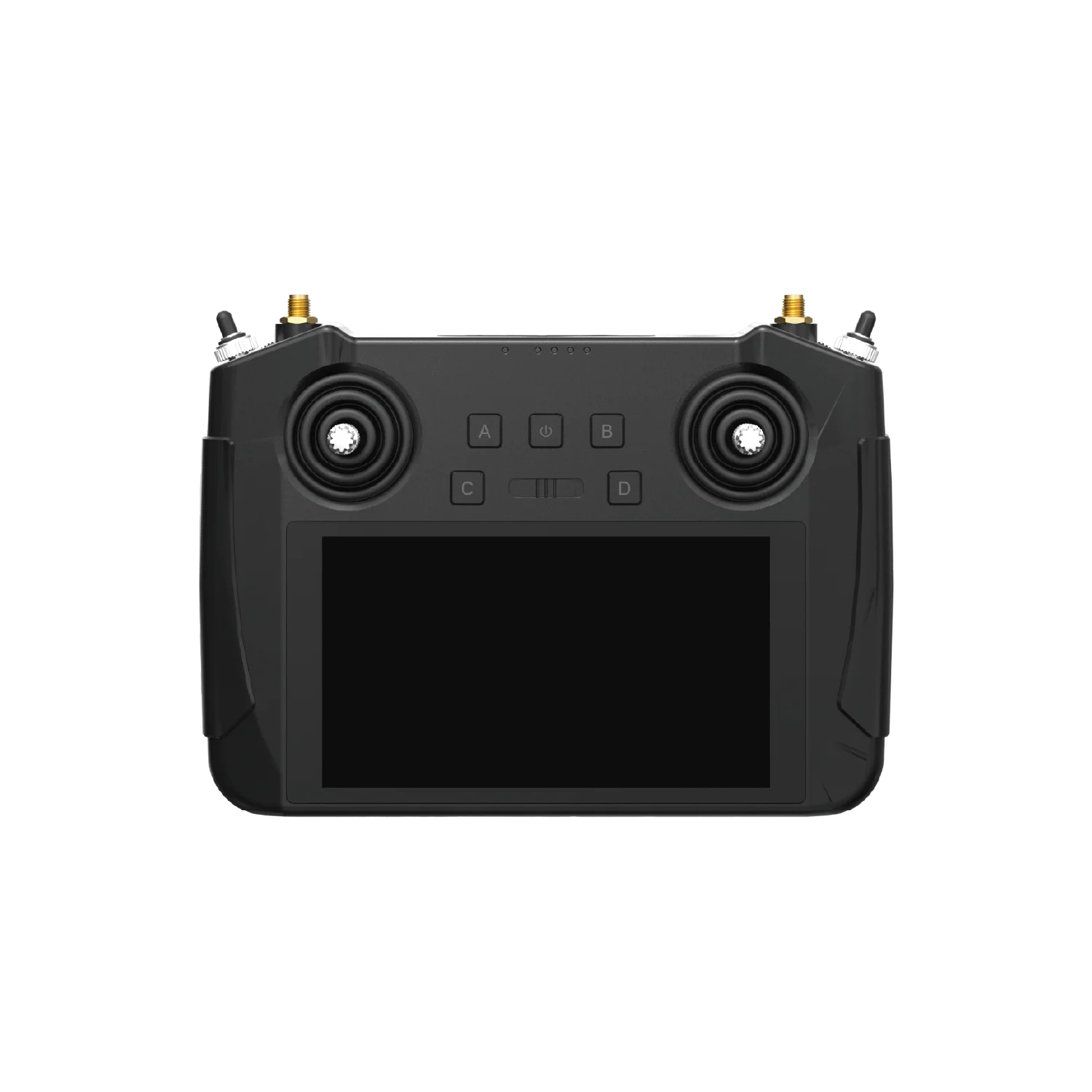
A 5.5-inch controller can be a sensible choice when one main view and a compact set of status information support the UAV task. The SIYI MK15 Enterprise Ground Control Station provides that smaller handheld format; the buyer's question is whether the intended application stays readable without repeated menu switching. Start with the minimum information the operator needs together, then decide what can wait until a separate review. This guide focuses on screen and information needs, using the documented MK15 platform as the reference. Camera-package matching is a separate selection decision rather than a reason to squeeze an overloaded interface onto a small panel.
Choose a representative moment from the inspection session. The operator may need one live camera view, a short status strip and a clear indication of the selected camera. That is a different screen demand from comparing multiple detailed views beside a map with long asset labels. A smaller controller can suit the first task even if it is a poor fit for the second.
Write the minimum useful view as a short list of information, then remove anything that does not affect the immediate decision. The purpose is not to hide important status. It is to avoid judging a compact screen by an interface designed around every possible data field.
Give special attention to information that changes. A static, abbreviated label can look neat while a longer real label wraps or covers the picture. Evaluate ordinary working content rather than an unusually clean demonstration page.
This is a workflow decision, not a statement that small displays are easier for everyone. Hand position, glasses, touch behavior and the app's own design can change the result. A compact terminal should be evaluated with the actual user and intended software, rather than selected only because it occupies less transport space.
| Information | Representative trial | Useful outcome |
|---|---|---|
| Main view | Show the feature or location used in normal work | The operator interprets it without leaning in repeatedly |
| Status text | Use the smallest essential value and longest usual label | Text remains distinct from its background |
| Touch command | Reach it while holding the terminal naturally | The hand does not cover the needed picture |
| Context change | Move between the main view and a secondary page | The operator understands where the previous context went |
Use this matrix to compare interface choices before comparing hardware sizes. An app with a clear single-view page may fit the MK15 well. An app with fixed tiny widgets may remain awkward even after optional information is removed.
The current manufacturer specification lists a 5.5-inch screen, Android 9, 2 GB RAM and 16 GB storage. It also distinguishes 13 physical channels from 16 communication channels. These facts describe the terminal and control provision. They do not guarantee that an arbitrary current app, every camera function or an unlimited set of background services will operate well on it.
For a buyer, the relevant software question is whether the intended build supports the required viewing and control task on the supplied device image. If the application needs services or a newer platform that is not available, a small-screen layout trial alone cannot resolve that issue.
Keep the discussion concrete: which app page must be open, which inputs does it use, and what information must stay visible? That is a more useful basis for evaluation than assuming a familiar operating-system label establishes complete integration.
A compact display works best when the live page has a clear purpose. Detailed report writing, long lists of asset attributes and comparisons between saved photographs can often belong to a different stage of the work. This is a workflow proposal, not a claim that the MK15 automatically transfers every file or synchronizes every record.
Decide when secondary information is needed and by whom. If it is only consulted before an observation, a separate page may be sufficient. If it must remain visible continuously to the operator, hiding it behind a tab may be the wrong compromise. If a second person owns the analysis, that person may need a different viewing arrangement.
The buyer can then distinguish a limitation in the task design from a limitation in the terminal. Changing the order of work may make a compact controller useful, but the workflow should never require overlooking essential information to save screen space.
Buttons, sticks and other physical inputs can reduce some touchscreen actions when their functions are supported by the application and integrated payload. They are particularly useful when the operator would otherwise open an on-screen panel over the image. Choose the small set of actions that actually occur during the observation rather than trying to use every available input.
A camera-view selection, a supported gimbal command and a clearly identified app mode are different functions. Their presence on a desired control list does not prove that the supplied camera and software implement them. Ask to see the intended input profile operating with the relevant view.
Touch remains important for menus and context changes. Evaluate it in the natural held position. A target that is easy to tap with the controller resting on a table can be more awkward when both hands are supporting the terminal.
SIYI lists an 850 g ground unit in the current MK15 specification. Compare the complete working assembly, including the relevant support and accessories, rather than treating the bare terminal as the whole position. Port access and cable clearance can influence the angle at which the panel is held and therefore its readability.
The Enterprise version documents ground HDMI output. An external screen can be considered when a separate observer needs a picture, but it adds another location and power requirement. It should serve a defined viewing role instead of becoming a permanent workaround for an application the operator cannot comfortably read.
Choose the MK15 Enterprise when a clear, focused page suits the work and the complete position remains practical. Share a representative app view and the minimum simultaneous information with FD. That makes the compact-screen discussion specific while leaving the separate camera and air-unit package decisions visible.
Consider two prospective MK15 Enterprise uses. The first operator needs one camera view, a short asset identifier and essential status during a routine visual observation. The second must continuously compare a detailed map, long equipment names and the camera image. These are hypothetical requirements, not claims about an included app.
Try the first page on the documented 5.5-inch format with the actual intended font size. If the picture and key text remain readable, adding a larger terminal may offer little benefit to that particular task. Try the second page with realistic long labels. If a necessary value repeatedly disappears behind a panel, decide whether the application can simplify the page or whether a larger workspace is justified.
Keep the computing requirement in the same comparison. A focused layout does not overcome an unsupported application build on the listed Android 9 platform. Likewise, a functioning app does not make dense text comfortable on a small panel. The useful decision requires both: supported software and a readable working page. This example turns compactness into a practical fit question rather than a preference based only on transport size or a photograph.
No. A single useful picture with legible essential status can fit a compact format. The result depends on the task, application layout and viewing distance. Continuous multi-pane comparison creates a different demand.
No. Physical and communication channel specifications describe available provision. The camera, software and assigned profile determine which functions are implemented in a supplied system.
No. Some applications offer layout or text options and others have fixed elements. Use the actual intended build to inspect the smallest important text, touch targets and page changes.
Only if that arrangement supports both roles. Repeatedly turning the handset away interrupts the operator view. A defined external viewing position may be preferable when two people need different sight lines.
A requirement for more information to remain readable together, such as a detailed map and camera view with long labels. Choose the size that serves those needs rather than assuming larger hardware resolves software or camera integration.
Review SIYI MK15 Enterprise Ground Control Station product information.

 Tel: +86-15059599996
 Email: info@fpvdroneskit.com
 MP/WhatsApp: +86-15059599996
 Manufacturer Address:Quanzhou Valley Nanan Science and Technology Innovation Center, No. 89 Shijing Avenue, Shijing Town, Nanan City, Fujian Province