


Training host
Runs the UniAI Studio application and the model-development work. The manufacturer specifies a Linux environment, with Ubuntu 22.04 or later.
| Price | On request |
|---|---|
| Model | UniAI Studio |
| Product type | AI model-training software platform |
| Interface or platform | Graphical/no-code training workflow |
| Configuration | Local/on-premises deployment |
| Rated specification | Model deployment device: SIYI second-generation AI module; other hardware requires revision confirmation |
SIYI UniAI Studio is a model-training platform for teams developing a specific visual inspection function. The manufacturer's catalog describes a graphical workflow that uses the customer's own dataset, supports local deployment and prepares models for supported SIYI AI hardware. It is relevant when an existing recognition model does not adequately describe the defects or scene in a civil UAV project.
For example, an infrastructure team may need a model for a defined equipment feature, while an environmental project may use different imagery. The useful first question is what must be recognized in the actual camera view, rather than how many generic object categories the software can name.
Runs the UniAI Studio application and the model-development work. The manufacturer specifies a Linux environment, with Ubuntu 22.04 or later.
The camera provides the material used to describe the inspection problem. Its viewpoint and image quality affect whether the proposed feature is visible.
The selected SIYI AI device runs the compatible exported model. A training application on a computer is not an extra sensor installed on the drone.
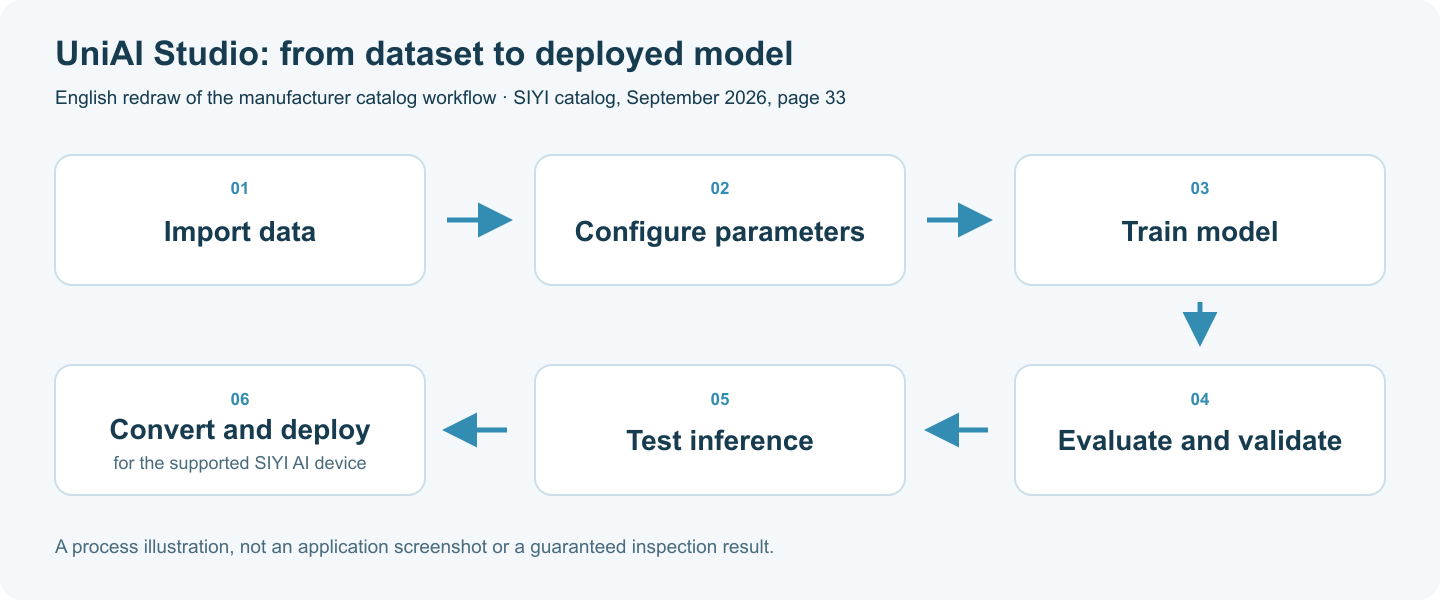
The catalog shows data import, parameter configuration, training, evaluation, inference testing and model conversion or deployment. These are separate stages: a completed training run is not yet evidence that the model gives a useful inspection result on the intended aircraft.
Ask for evaluation against representative images from the proposed camera and working conditions. Keep difficult examples in the discussion, such as small features, changes in illumination and backgrounds similar to the inspected structure.
The current manufacturer FAQ identifies second-generation SIYI AI modules as supported destinations for training output. The catalog also refers more broadly to AI payloads, so any other gimbal or pod needs its exact revision checked before the model is promised as deployable. The presence of a camera in the same product range is not sufficient evidence of export compatibility.
Plan the training host as a separate part of the project. Ask for the current installation requirements, including processor, memory, storage and GPU compatibility. Local deployment also needs a clear access arrangement: the manufacturer describes initial online login and subsequent local training, rather than an unrestricted software copy with no account conditions.
Describe the asset being inspected, the visual feature to recognize and the camera already selected. Include the AI module model, training-computer environment and a small description of the available dataset. Ask which software release, model output and support activities fit this combination.
State whether you need software access only or help with dataset preparation, evaluation and hardware integration. Current availability, licence conditions and service scope should be quoted explicitly. Recognition accuracy is established through project evaluation; this page does not assign a universal success percentage.
The manufacturer identifies a Linux training platform. Confirm the Ubuntu host and application requirements; the ground controller has a different role in the system.
Do not assume that. Start with the supported second-generation AI module and check any other intended device and firmware version individually.
No. The dataset, camera view and evaluation results determine whether a proposed model is suitable for a particular inspection task.
| Product type | AI model-training software platform |
|---|---|
| Deployment approach | Local/on-premises deployment |
| Training input | Customer-supplied datasets |
| Training interface | Graphical/no-code training workflow |
| Catalog process | Data import; configuration; training; evaluation; inference testing; model conversion/deployment |
| Training platform | Linux; Ubuntu 22.04 or later |
| Model deployment device | SIYI second-generation AI module; other hardware requires revision confirmation |
| Application access and training | Initial online login; local training can run offline in the supported setup |

 Tel: +86-13959965075
 Email: info@fpvdroneskit.com
 MP/WhatsApp: +86-13959965075
 Manufacturer Address:Quanzhou Valley Nanan Science and Technology Innovation Center, No. 89 Shijing Avenue, Shijing Town, Nanan City, Fujian Province